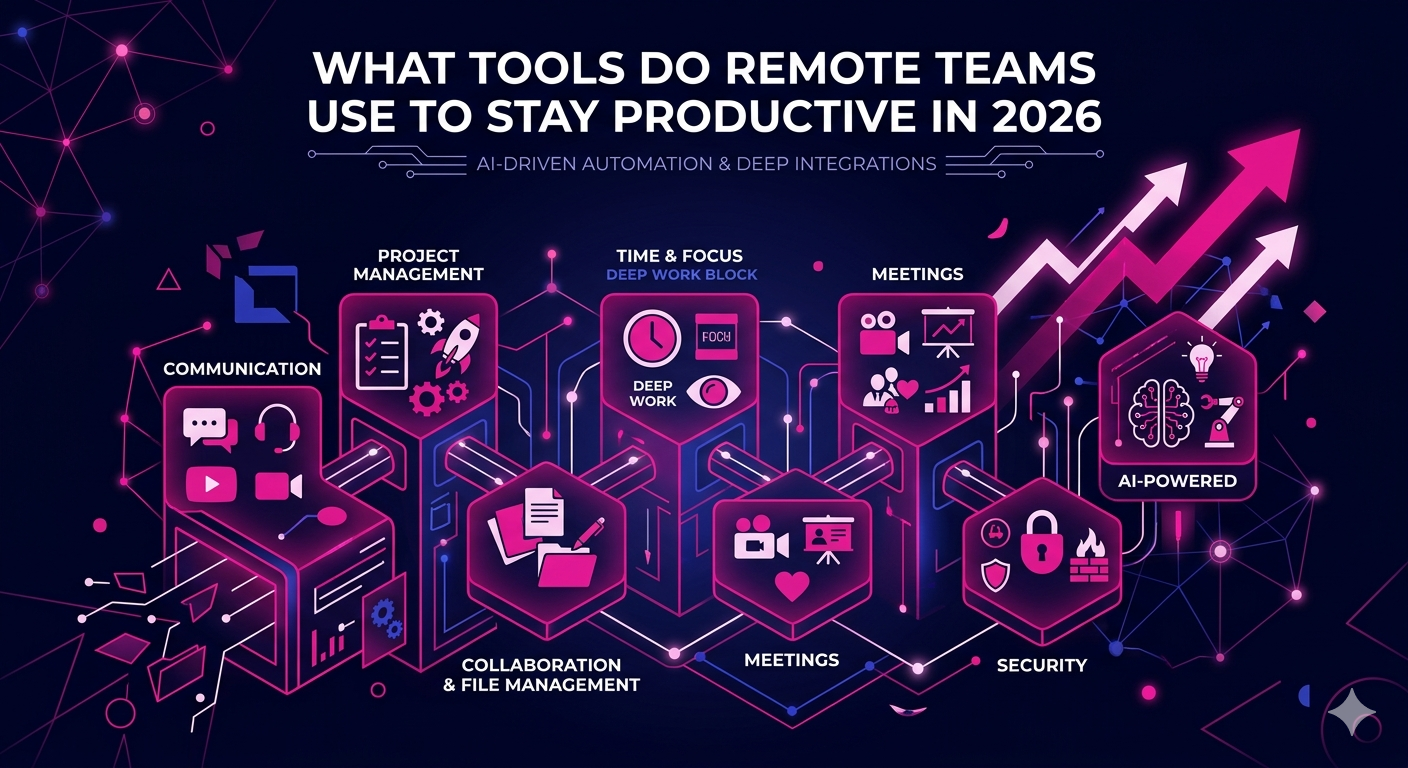
If you have ever wondered what tools do remote teams use to stay productive, you are not alone. As distributed work becomes the default operating model for businesses worldwide, the right technology stack can be the difference between a team that thrives and one that struggles to keep up. In 2026, remote work tools have evolved dramatically, offering smarter automation, deeper integrations, and AI-powered features that help professionals stay focused and deliver results regardless of time zone or location.
This guide breaks down the essential categories of remote productivity tools, highlights the best options available today, and explains how to build a stack that works for your team.
Why Remote Teams Need the Right Productivity Tools
Remote work eliminates the natural coordination that happens in a physical office. There are no hallway conversations, no quick desk visits, and no shared whiteboards. Without the right infrastructure, remote teams face fragmented communication, missed deadlines, and low visibility into who is doing what.
The right set of tools solves these problems by creating a digital workspace where collaboration, accountability, and focus become possible at scale. Whether you are managing a team of five or five hundred, your tool stack directly shapes your team’s performance.
Communication Tools That Keep Remote Teams Connected
Clear, fast, and organized communication is the foundation of any productive remote setup. These are the tools most teams rely on in 2026.
Slack and Microsoft Teams
Slack remains the go-to platform for team messaging, with organized channels, threaded conversations, and a rich library of integrations. Microsoft Teams is the preferred choice for organizations already deep in the Microsoft 365 ecosystem. Both platforms offer voice and video calling, file sharing, and workflow automation features that reduce the need to switch between apps constantly.
Loom and Async Video Tools
Short video messages have become a staple of remote communication. Loom allows team members to record and share quick video updates instead of scheduling a meeting for every question. This approach cuts meeting fatigue while improving the clarity of communication, especially across time zones.
Project Management Tools Remote Teams Rely On
Knowing what tools do remote teams use to stay productive would be incomplete without a deep look at project management software. These platforms serve as the operational backbone of any distributed team.
Asana
Asana is a favorite among remote teams for its clean interface and powerful task management features. Teams can create projects, assign tasks, set deadlines, and track progress through timeline views, Kanban boards, and dashboards. In 2026, Asana’s AI features can automatically suggest task assignments based on workload and past performance.
ClickUp
ClickUp is a highly flexible all-in-one platform that combines task management, docs, goals, and time tracking in a single workspace. It is particularly popular with teams that want to consolidate multiple tools into one platform. Its customization options are extensive, making it adaptable for teams of any size or industry.
Notion
Notion functions as a project management tool and knowledge base rolled into one. Teams use it to manage tasks, document processes, build wikis, and plan roadmaps. Its block-based editor makes it easy for non-technical users to set up powerful workflows without any coding knowledge.
Remote Team Collaboration and File Management Tools
Real-time collaboration on documents, designs, and spreadsheets is essential when team members are spread across different locations.
Google Workspace
Google Docs, Sheets, and Slides remain indispensable for teams that need to co-author documents in real time. Google Drive provides centralized file storage with strong access controls, making it easy to share the right files with the right people. In 2026, Google’s built-in AI writing and analysis features make it even more powerful for remote workers.
Figma
For design and product teams, Figma is the collaborative design tool of choice. Multiple team members can work on the same design file simultaneously, leave comments, and hand off assets to developers, all within a browser-based interface.
Time Management and Focus Tools for Remote Workers
Without the structure of a physical office, remote workers often struggle with focus and time management. These tools help.
Toggl Track
Toggl Track allows individuals and teams to log time against specific projects or clients. It provides detailed reports that show exactly where time is being spent, which helps teams identify inefficiencies and optimize how they work.
Clockwise
Clockwise uses AI to intelligently reschedule meetings and protect deep work blocks in your calendar. For remote teams that have back-to-back meeting schedules, Clockwise can automatically create focused work time without requiring manual calendar management.
Virtual Meeting and Video Conferencing Tools
Live video calls remain an important part of how remote teams build relationships and make decisions together.
Zoom
Zoom continues to dominate the video conferencing space in 2026. Its reliability, breakout rooms, webinar capabilities, and AI meeting summaries make it the standard for distributed teams worldwide. The AI Companion feature can now automatically generate meeting notes, action items, and follow-up summaries.
Around and Mmhmm
For teams that want a less formal, more engaging video experience, tools like Around and Mmhmm offer creative presentation formats, background customization, and lightweight overlays that make virtual meetings feel more personal and less draining.
HR and Team Management Tools for Remote Organizations
Managing a distributed workforce requires specialized tools that go beyond traditional HR software.
Deel and Remote
Platforms like Deel and Remote handle global payroll, contractor payments, and compliance for teams with members in multiple countries. In 2026, these platforms have become essential for companies hiring internationally without wanting to set up legal entities in every market.
Lattice and 15Five
Performance management platforms like Lattice and 15Five help remote managers track employee progress, run structured check-ins, and collect continuous feedback. These tools are critical for maintaining visibility into team morale and performance without micromanaging.
If your business is looking to build a high-performing remote sales or marketing team, working with specialists can accelerate your results significantly. Explore how The Remote Reps virtual assistants and remote productivity specialists can help your team operate at peak performance using the right tools and workflows.
Security and Password Management Tools
Productivity means nothing without security. Remote teams access sensitive systems from multiple devices and networks, making security tools non-negotiable.
1Password Teams
1Password is the most widely used password manager for remote teams. It allows secure sharing of credentials across team members without exposing actual passwords, supports two-factor authentication, and provides admin controls for managing access when team members change roles or leave the organization.
NordLayer and Cloudflare Access
Zero-trust network access tools like NordLayer and Cloudflare Access provide secure connections to internal systems without requiring a traditional VPN setup. These tools verify every login attempt and device before granting access, significantly reducing the attack surface for remote work environments.
AI-Powered Productivity Tools Transforming Remote Work in 2026
The question of what tools do remote teams use to stay productive in 2026 increasingly points to AI-powered assistants and automation tools that handle repetitive tasks and amplify human output.
Claude and ChatGPT for Work
AI writing and reasoning tools have become everyday utilities for remote professionals. Teams use them to draft communications, summarize long documents, generate reports, prepare meeting briefs, and research topics at a speed that was not possible just a few years ago.
Zapier and Make for Automation
Workflow automation tools like Zapier and Make connect disparate apps and automate repetitive processes without requiring custom development. A remote team might use Zapier to automatically create a Slack notification whenever a new lead is added to their CRM, or to log time entries from a project management tool into a spreadsheet.
According to research from Gallup’s Workplace research on remote team productivity tools and distributed work practices, teams that use structured digital workflows and the right collaboration technology consistently report higher engagement and output than those relying on informal coordination.
How to Build a Remote Productivity Stack That Actually Works
Knowing what tools remote teams use is only half the battle. The other half is integrating them thoughtfully so they work together rather than adding noise and complexity. Here are the principles that successful remote teams follow in 2026.
- Start with communication: Choose one primary messaging platform and stick to it. Fragmented communication across email, Slack, and WhatsApp creates confusion.
- Centralize project tracking: Every task and project should live in one system. Scattered to-do lists in different tools lead to missed work.
- Document everything: Use a shared knowledge base so institutional knowledge does not live only in one person’s head.
- Audit regularly: Remove tools that duplicate functionality. Aim for depth over breadth in your stack.
- Train your team: Even the best tool fails if people do not know how to use it. Budget time for onboarding and adoption.
Conclusion
Understanding what tools do remote teams use to stay productive is the first step toward building a team that consistently delivers strong results. In 2026, the best remote teams combine powerful communication platforms, structured project management systems, smart automation, and AI-assisted workflows to create an environment where distributed work thrives.
Whether you are scaling a remote sales team, building a virtual marketing operation, or simply optimizing how your current team works, the tools you choose today will shape your results for years to come. Start with the fundamentals, build in layers, and invest in tools that match the size and complexity of your operation.
Ready to take your remote team to the next level? The Remote Reps helps businesses build, manage, and optimize high-performance remote teams with the right talent and the right tools.
Frequently Asked Questions
What tools do remote teams use to stay productive when working across different time zones?
Remote teams working across time zones rely heavily on asynchronous communication tools like Slack, Loom, and Notion to reduce the need for real-time coordination. Project management platforms like Asana and ClickUp allow team members to pick up work regardless of when they start their day, while shared documentation in Google Workspace or Notion ensures everyone has access to the latest information without waiting for a meeting.
What tools do remote teams use to stay productive during daily standups and team check-ins?
Most remote teams use Zoom or Microsoft Teams for live standups, while others prefer asynchronous alternatives like Slack’s standup bots or tools like Geekbot, which prompts team members to submit written updates on their own schedule. The choice depends on team size, time zone spread, and meeting culture preferences.
What tools do remote teams use to stay productive when managing multiple projects simultaneously?
Teams managing multiple projects simultaneously typically rely on platforms like ClickUp, Asana, or Monday.com. These tools provide portfolio views, resource management features, and workload dashboards that give managers a clear picture of capacity and progress across all active projects without requiring constant status meetings.
What tools do remote teams use to stay productive and secure at the same time?
Security and productivity go hand in hand for remote teams. Tools like 1Password Teams handle secure credential sharing, while Cloudflare Access and NordLayer provide zero-trust network security. When team members combine these security tools with productivity platforms, they maintain strong data protection without slowing down their workflows.
What tools do remote teams use to stay productive when onboarding new team members?
Onboarding remote team members effectively requires a combination of tools. Most teams use a knowledge base like Notion or Confluence to store onboarding documentation, a project management tool like Asana to track onboarding tasks, and video tools like Loom to record walkthroughs that new hires can watch at their own pace. Structured onboarding in these platforms significantly reduces time to productivity for new remote employees.
What tools do remote teams use to stay productive when managing freelancers and contractors?
Managing remote contractors requires tools that handle both work coordination and compliance. Platforms like Deel and Remote manage payments and contracts across different countries, while project management tools ensure contractors stay aligned with team goals. Time tracking software like Toggl Track provides accurate billing records and helps both parties stay accountable to agreed timelines.