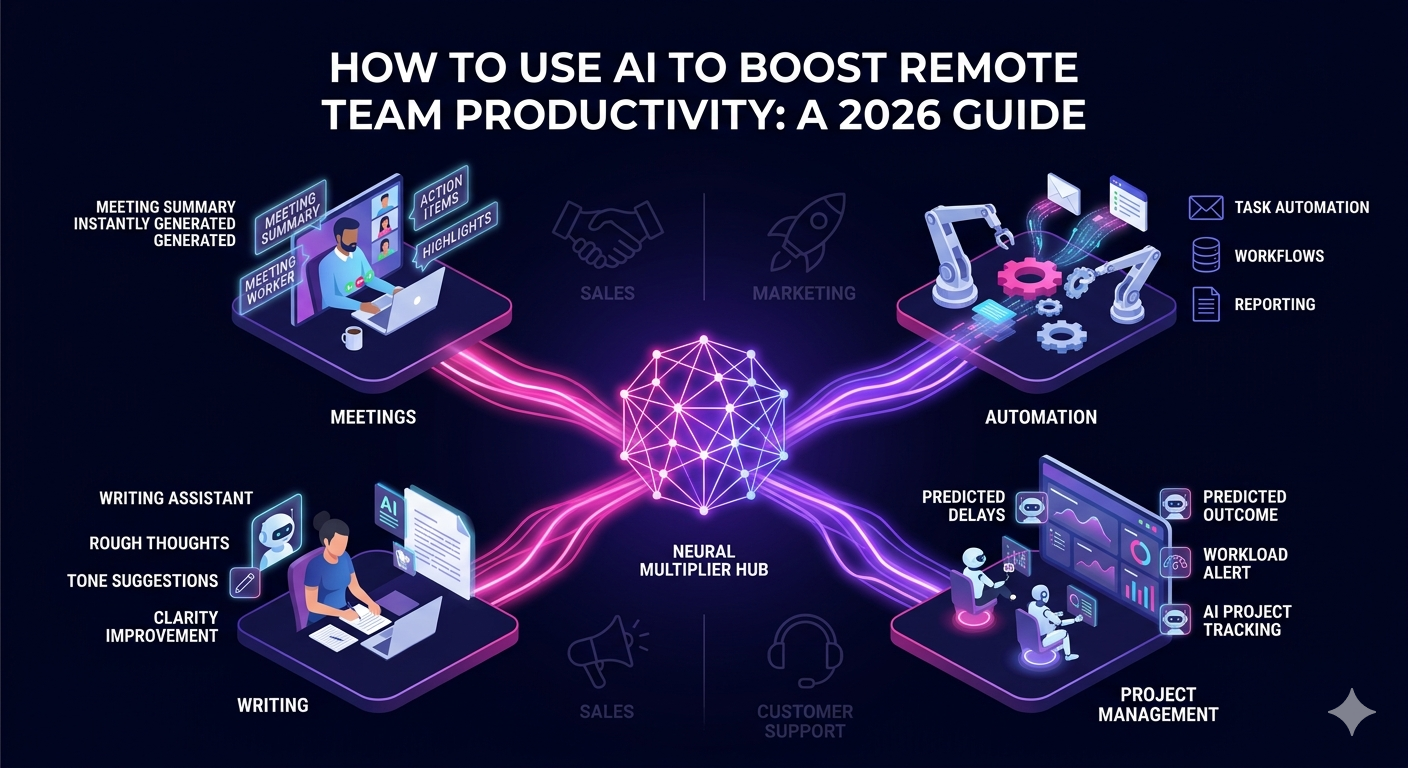
Understanding how to use AI to boost remote team productivity has shifted from a competitive advantage to a baseline expectation for high-performing distributed teams. In 2026, AI tools are woven into nearly every layer of remote work, from meeting summaries and task automation to real-time writing assistance and intelligent project tracking. The businesses winning with remote teams are not just hiring great people. They are equipping those people with AI systems that multiply their output.
This guide walks you through exactly how to deploy AI across your remote team to reduce friction, cut wasted time, and drive consistent results across every function.
Why AI Is Now Essential for Remote Team Productivity
Remote teams face a unique set of productivity challenges that in-office teams simply do not deal with at the same scale. Async communication creates delays. Time zone gaps slow decision-making. Without physical oversight, accountability can drift. Information gets scattered across tools. Context gets lost between handoffs.
AI addresses each of these problems directly. It can summarize long Slack threads in seconds, transcribe and action meetings automatically, draft communications faster than any human can type, and flag when a project is falling behind before the manager even notices. For remote teams, AI is not just a productivity tool. It is an operational layer that makes distributed work structurally more reliable.
Step 1: Use AI to Eliminate Meeting Overhead
Meetings are one of the biggest productivity drains on remote teams, not because the conversations are unimportant but because of the time spent recapping, documenting, and following up on them. AI meeting tools solve this problem almost entirely.
Top AI Tools for Meeting Productivity
- Otter.ai and Fireflies.ai: Automatically transcribe calls, generate summaries, and extract action items in real time
- Notion AI: Converts meeting notes into structured documents and project updates instantly
- Zoom AI Companion: Generates post-meeting summaries and highlights key decisions without any manual input
When every meeting produces an automatic summary with action items and owners, remote teams stop losing decisions in email threads and start executing faster. This single change can recover several hours per week per team member.
Step 2: Automate Repetitive Tasks with AI Workflows
A large portion of remote work involves repetitive, low-cognitive tasks that consume significant time without generating meaningful output. Data entry, status updates, report formatting, lead list management, and scheduling are all prime candidates for AI automation.
How to Use AI for Task Automation in Remote Teams
- Use Zapier or Make with AI integrations to automate data movement between tools like CRMs, project managers, and communication platforms
- Use ChatGPT or Claude to draft templated communications, summaries, and reports from raw inputs
- Use AI-powered CRM features in HubSpot or Salesforce to auto-log activities, score leads, and suggest next steps
- Use Reclaim.ai or Motion to auto-schedule deep work blocks and protect focus time across time zones
The goal is not to replace your remote team with automation. It is to remove the work that drains their time so they can focus on the judgment-intensive tasks where human skill actually matters.
Step 3: Boost Communication Quality with AI Writing Tools
Clear, concise communication is harder in a remote environment where tone and intent do not benefit from body language or vocal delivery. AI writing assistants help every member of a remote team communicate more effectively regardless of their native language or writing ability.
AI Tools That Improve Remote Team Communication
- Grammarly Business: Provides tone suggestions, clarity improvements, and brand voice alignment across team communications
- ChatGPT and Claude: Help team members draft emails, proposals, SOPs, and client updates faster and with greater precision
- Loom with AI summaries: Converts async video messages into text summaries so recipients can scan quickly before deciding whether to watch the full video
When every team member can produce clear, professional communication quickly, remote collaboration speeds up and misunderstandings drop significantly. This is especially impactful for teams with members across multiple languages and cultures.
Step 4: Use AI for Smarter Project Management and Accountability
One of the most powerful ways to use AI to boost remote team productivity is at the project management layer. AI-enhanced project tools do not just track tasks. They analyze patterns, predict delays, and surface blockers before they become crises.
AI-Powered Project Management Features Worth Using
- Automated status updates that pull data from connected tools and update project boards without manual input
- Workload balancing alerts that flag when a team member is over-allocated before deadlines are missed
- AI-generated project briefs and task descriptions that reduce the time managers spend writing context for their teams
- Deadline prediction models that flag at-risk deliverables based on historical completion patterns
Tools like Asana, Monday.com, and Linear have incorporated AI features along these lines throughout 2025 and 2026, making smarter project oversight accessible without adding management headcount.
Step 5: Train Your Remote Team to Use AI Effectively
Deploying AI tools across a remote team only delivers results if the team actually knows how to use them well. Poor AI adoption is one of the most common reasons companies invest in tools and see minimal return. The solution is structured, role-specific AI training built into your onboarding and ongoing learning processes.
How to Build AI Literacy Across a Remote Team
- Create short async video tutorials for each AI tool using Loom, covering the specific use cases relevant to each role
- Share a prompt library with pre-built AI prompts for common tasks like writing client updates, summarizing research, or formatting reports
- Run a monthly AI tips session where team members share workflows that have saved them time
- Set usage expectations in your team handbook so AI tools become a standard part of how work gets done, not an optional extra
AI literacy compounds over time. Teams that invest six months in building strong AI habits consistently outperform those that treat AI as an individual preference rather than a team-wide capability.
Step 6: Apply AI to Specific Remote Team Functions
The impact of AI varies by function. Here is how to use AI to boost remote team productivity across the roles most common in distributed businesses:
Sales and SDR Teams
AI can draft personalized cold outreach sequences, summarize prospect research, update CRM records automatically after calls, and analyze reply rates to optimize messaging. Remote sales reps using AI tools consistently book more meetings with less prospecting time.
Marketing and Content Teams
AI accelerates content creation, social media scheduling, SEO research, and performance reporting. Remote marketers can produce significantly more output per week when AI handles first drafts, keyword clustering, and campaign briefing.
Customer Support Teams
AI can draft suggested responses, pull relevant knowledge base articles, summarize ticket history, and categorize inbound issues automatically. This reduces handle time and increases consistency across a distributed support team operating across time zones.
Operations and Executive Assistants
AI helps remote operations staff manage complex schedules, build process documentation, draft vendor communications, and track project milestones with far less manual effort than traditional methods require.
If you are building or scaling a remote team and want professionals who are already skilled in AI-enhanced workflows, explore how The Remote Reps executive assistant services place vetted remote professionals ready to work with modern AI tools from day one.
For an independent look at how leading organizations are using AI to boost remote team productivity, McKinsey’s State of AI report provides data-backed benchmarks on AI adoption and productivity gains across distributed workforces.
FAQ: How to Use AI to Boost Remote Team Productivity
How can I start using AI to boost remote team productivity without a large budget?
You can start using AI to boost remote team productivity with free or low-cost tools like ChatGPT, Claude, Otter.ai, and Grammarly. Begin by identifying your team’s biggest time drains, whether that is meeting follow-ups, report writing, or repetitive data tasks, and apply AI to those first before expanding to a broader stack.
What are the best AI tools for boosting remote team productivity in 2026?
The best AI tools to boost remote team productivity in 2026 include Otter.ai and Fireflies for meeting intelligence, ChatGPT and Claude for writing and analysis, Notion AI for documentation, Reclaim.ai for scheduling, and AI-powered CRM features in HubSpot or Salesforce for sales teams. The right stack depends on your team’s specific functions and workflows.
How do I get my remote team to actually use AI tools consistently?
To use AI effectively and boost remote team productivity at scale, make AI tools part of your standard operating procedures rather than optional extras. Create role-specific training resources, share a prompt library for common tasks, and build AI usage checkpoints into your onboarding process so new hires adopt the tools from their first week.
Can AI really replace the need to hire more remote team members?
AI can significantly extend the capacity of your existing remote team by automating repetitive tasks and accelerating high-output work, but it does not replace the need for skilled people. The best approach is to use AI to boost remote team productivity so each hire delivers more value, rather than using AI as a substitute for building a capable team.
How does AI help with remote team accountability and performance tracking?
AI boosts remote team productivity through smarter accountability by automating status reporting, flagging at-risk deadlines before they are missed, tracking workload distribution across team members, and surfacing performance trends from project data. This gives managers real-time visibility without requiring constant manual check-ins.
Is there a risk of over-relying on AI in a remote team environment?
Yes. When learning how to use AI to boost remote team productivity, it is important to maintain human judgment at key decision points. AI is most effective as an accelerator for skilled professionals, not as a replacement for critical thinking, relationship management, or creative strategy. The most productive remote teams use AI to handle low-value repetition while preserving human ownership of high-stakes work.