Remote work is no longer a temporary trend. In 2026, distributed teams are the standard operating model for thousands of businesses worldwide. But building a high-performing remote workforce requires more than just hiring the right people. It demands the right infrastructure, and at the core of that infrastructure are communication tools for remote teams.
Whether you are managing a fully remote sales team, a distributed marketing department, or a hybrid workforce spread across multiple time zones, the tools your team uses to communicate can make or break productivity. This guide walks you through the top tools, what to look for, and how to build a communication stack that actually works.
Why Communication Tools Matter More Than Ever for Remote Teams
When your team is not sharing a physical office, the cost of poor communication is immediate and measurable. Missed messages lead to missed deadlines. Unclear expectations create duplicated work. Siloed teams produce fragmented results.
According to research published by McKinsey in early 2026, companies that invest in structured communication frameworks for remote teams report up to 25% higher employee productivity and significantly lower turnover compared to those that rely on informal methods alone.
The right remote team communication software solves three core problems:
- Reducing information silos between departments and time zones
- Keeping asynchronous and synchronous communication organized
- Giving managers visibility without resorting to micromanagement
If you are building or scaling a remote team, the tools you choose today will shape your team culture for years to come.
Top Categories of Communication Tools for Remote Teams
1. Real-Time Messaging and Chat Platforms
Instant messaging remains the backbone of daily communication for most remote teams. These platforms replace the casual hallway conversations and quick desk check-ins that happen naturally in an office.
Slack continues to lead this category in 2026, with robust channel organization, deep integrations with tools like Salesforce and Notion, and an improved AI-powered search that helps teams surface important messages from months past. Its Huddles feature has reduced the need for formal video calls for quick syncs.
Microsoft Teams remains a dominant choice for enterprise organizations already embedded in the Microsoft 365 ecosystem. For companies using Outlook, SharePoint, and Office tools daily, Teams provides a seamlessly integrated experience.
Discord has grown beyond gaming communities and is now widely used by tech startups and creative agencies who prefer its flexible server structure and low-friction voice channels.
2. Video Conferencing Tools
Face-to-face video meetings are essential for building trust, onboarding new hires, and running brainstorming sessions where real-time collaboration matters.
Zoom remains the most recognized name in video conferencing and continues to add AI features in 2026, including real-time transcription, meeting summaries, and smart scheduling assistants.
Google Meet has become increasingly competitive, especially for teams using Google Workspace. Its noise cancellation and automatic caption features make it accessible and reliable.
Loom deserves special mention here. While not a live conferencing tool, Loom allows team members to record quick video messages and walkthroughs asynchronously. For globally distributed teams, this dramatically reduces scheduling friction.
3. Project Management and Async Collaboration Tools
Not every team interaction needs to happen in real time. Asynchronous communication tools give remote workers the flexibility to work in their peak hours while still staying coordinated with the team.
Notion has evolved into a full-scale collaboration hub, combining documentation, wikis, task tracking, and database management. Its AI assistant now drafts summaries, meeting notes, and project briefs automatically.
Asana and Monday.com remain top choices for structured project management, with timeline views, workload balancing, and automation features that help distributed teams stay on track without constant check-ins.
Linear has gained serious traction among engineering and product teams who want a faster, more focused alternative to Jira.
4. Document Collaboration Tools
For teams that produce reports, proposals, content, and strategies, real-time document collaboration is non-negotiable.
Google Workspace (Docs, Sheets, Slides) continues to be the gold standard for lightweight, browser-based document collaboration. Comment threads, version history, and simultaneous editing make it the default choice for most small to mid-size teams.
Notion and Coda fill the gap between static documents and dynamic databases, allowing teams to create living documents that update alongside project progress.
How to Choose the Right Communication Tools for Your Remote Team
With so many options on the market, choosing the right stack can feel overwhelming. Here is a practical framework to guide your decision.
Define Your Communication Needs First
Before comparing features, map out how your team actually communicates. How many people are on the team? Are they spread across multiple time zones? Is most of your communication synchronous or async? Do you need strong integration with a CRM or HR platform?
Different teams need different tools. A five-person content team has very different needs from a fifty-person sales department with SDRs, account executives, and support staff.
Prioritize Integration Over Features
The best communication tool is not necessarily the one with the most features. It is the one that fits cleanly into your existing workflow. Look for tools that integrate with your CRM, your calendar, your project management software, and your file storage. Fragmented tool stacks create just as much communication chaos as having no tools at all.
Consider Async-First Workflows
In 2026, high-performing remote teams are increasingly async-first. This means defaulting to written communication, recorded video updates, and structured documentation rather than defaulting to meetings. Tools like Loom, Notion, and Slite support this approach and reduce meeting fatigue across time zones.
If you are building a distributed sales or marketing team, explore how virtual assistants at The Remote Reps can help manage communication workflows, schedule coordination, and async documentation so your core team stays focused on high-value work.
Building a Lean Communication Stack for Remote Teams
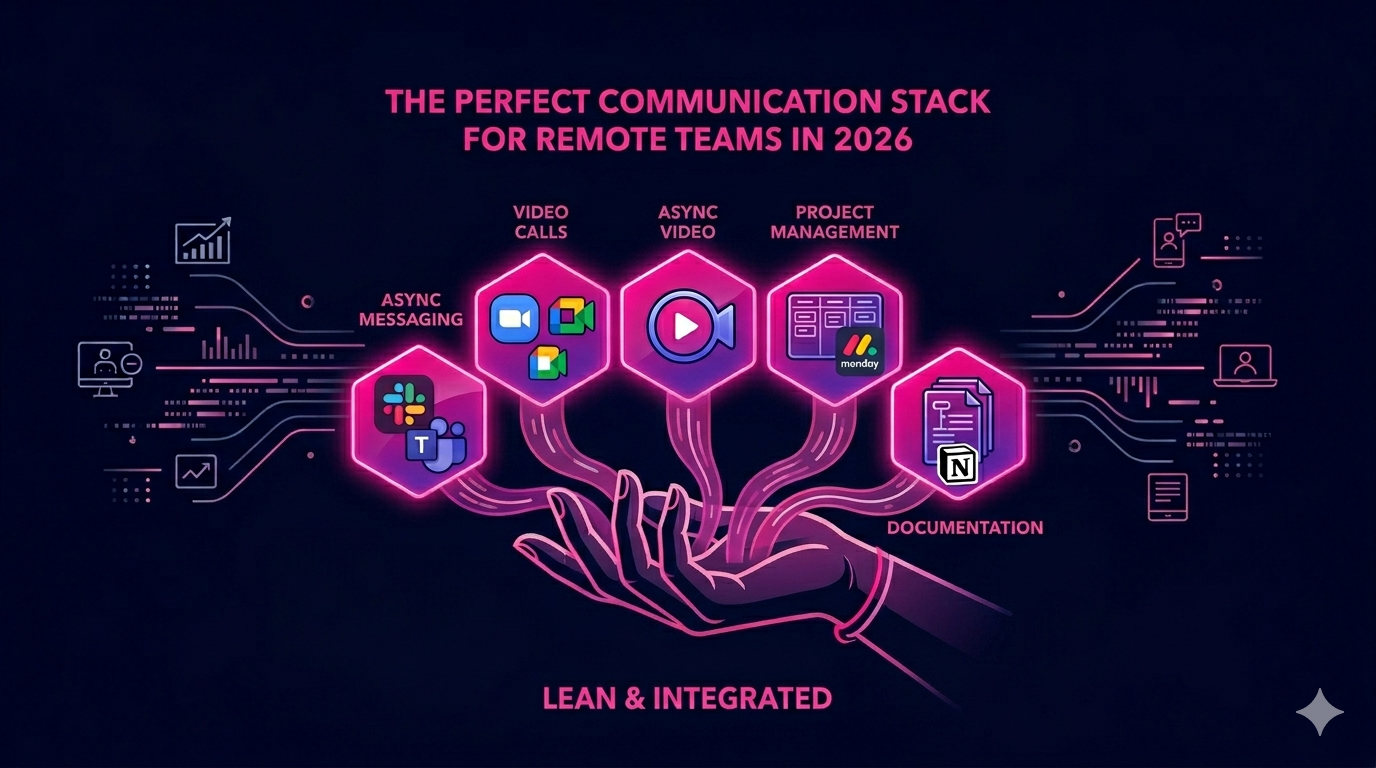
Most successful remote teams operate with a lean, intentional tool stack rather than dozens of overlapping platforms. A practical setup for most teams in 2026 looks like this:
- Async messaging: Slack or Microsoft Teams for daily communication
- Video calls: Zoom or Google Meet for team meetings and one-on-ones
- Async video: Loom for walkthroughs, updates, and onboarding
- Project management: Asana, Monday.com, or Linear for task coordination
- Documentation: Notion or Google Workspace for shared knowledge and collaboration
The goal is not to have the most tools. The goal is to have the fewest tools that cover every communication need without redundancy or confusion about where to find information.
For expert guidance on building remote teams that operate at peak efficiency, visit The Remote Reps, a trusted resource for businesses scaling distributed teams with communication best practices built in from day one.
You can also learn more about how leading companies are optimizing communication tools for remote teams in Buffer’s 2026 State of Remote Work report, which covers tool adoption trends across thousands of distributed organizations worldwide.
Common Mistakes Teams Make With Remote Communication Tools
Even teams with access to great tools fall into patterns that undermine communication. Watch out for these common pitfalls.
- Tool sprawl: Using five different chat tools with no clear convention leads to missed messages and fragmented conversations.
- Notification overload: Pinging team members on every minor update creates attention fragmentation and burnout.
- Lack of documentation culture: Relying on meetings and verbal communication without written follow-up leaves remote workers without context.
- Ignoring time zones: Expecting synchronous responses from team members in vastly different time zones creates resentment and reduces engagement.
- No onboarding for tools: New hires who are not properly trained on how the team uses its communication stack will quickly develop workarounds that fragment communication further.
Conclusion: Choose Tools That Match Your Team Culture
The right communication tools for remote teams are the ones your team will actually use, consistently and correctly. In 2026, there is no shortage of excellent options across every category. The real differentiator is how intentionally you build your communication culture around those tools.
Start with your team’s real workflow, select tools that integrate cleanly, document your communication norms, and revisit your stack at least once a year as your team grows. The companies that get this right will build remote teams that outperform their in-office counterparts in clarity, speed, and results.
Ready to build a high-performing remote team with the right structure in place? Explore how The Remote Reps can match you with skilled virtual assistants who are already trained in the communication tools your team relies on every day.
Frequently Asked Questions About Communication Tools for Remote Teams
What are the most essential communication tools for remote teams in 2026?
The most essential communication tools for remote teams in 2026 include a real-time messaging platform like Slack or Microsoft Teams, a video conferencing tool like Zoom or Google Meet, an async video tool like Loom, a project management platform like Asana or Monday.com, and a documentation hub like Notion or Google Workspace. Together, these tools cover both synchronous and asynchronous communication needs for any distributed team.
How do communication tools for remote teams improve productivity?
Communication tools for remote teams improve productivity by reducing the time employees spend searching for information, waiting for responses, and attending unnecessary meetings. Structured channels, documented workflows, and async-friendly tools allow team members to work in their peak hours while staying aligned with the rest of the team, regardless of time zone.
What should I look for when choosing communication tools for remote teams?
When choosing communication tools for remote teams, prioritize integration with your existing software stack, ease of use across different devices, support for both async and synchronous workflows, strong search and notification controls, and a reliable mobile experience. Avoid tools that require excessive onboarding time or lack mobile support, as these create friction for distributed team members.
How many communication tools does a remote team actually need?
Most remote teams perform best with three to five core communication tools that cover distinct use cases: messaging, video, project management, and documentation. Expanding beyond that often creates tool sprawl, where team members are unsure where to find information or which platform to use for a given type of communication. Less is more when each tool has a clear, specific role.
Are communication tools for remote teams secure enough for sensitive business information?
Yes, most enterprise-grade communication tools for remote teams offer strong security features including end-to-end encryption, two-factor authentication, role-based access controls, and compliance certifications like SOC 2, GDPR, and HIPAA. Tools like Slack, Microsoft Teams, and Zoom all offer enterprise security tiers. Always review a tool’s security documentation and ensure it meets your industry’s compliance requirements before deploying it team-wide.
How can small businesses afford the best communication tools for remote teams?
Many of the best communication tools for remote teams offer free tiers or affordable startup plans that are more than sufficient for small teams. Slack, Notion, Asana, Zoom, and Google Workspace all have free or low-cost plans for teams under a certain size. As your team grows, most platforms offer scalable pricing so you only pay for what you need. Prioritize tools with generous free tiers when starting out and upgrade selectively as your needs evolve.