
Customer expectations have never been higher. In 2026, buyers want fast, accurate, and empathetic support across multiple channels, and they want it around the clock. For growing businesses, meeting that demand with an in-house team is expensive and logistically challenging. That is why so many companies are learning how to build a remote customer support team that delivers consistent, high-quality service without the overhead of a traditional support operation.
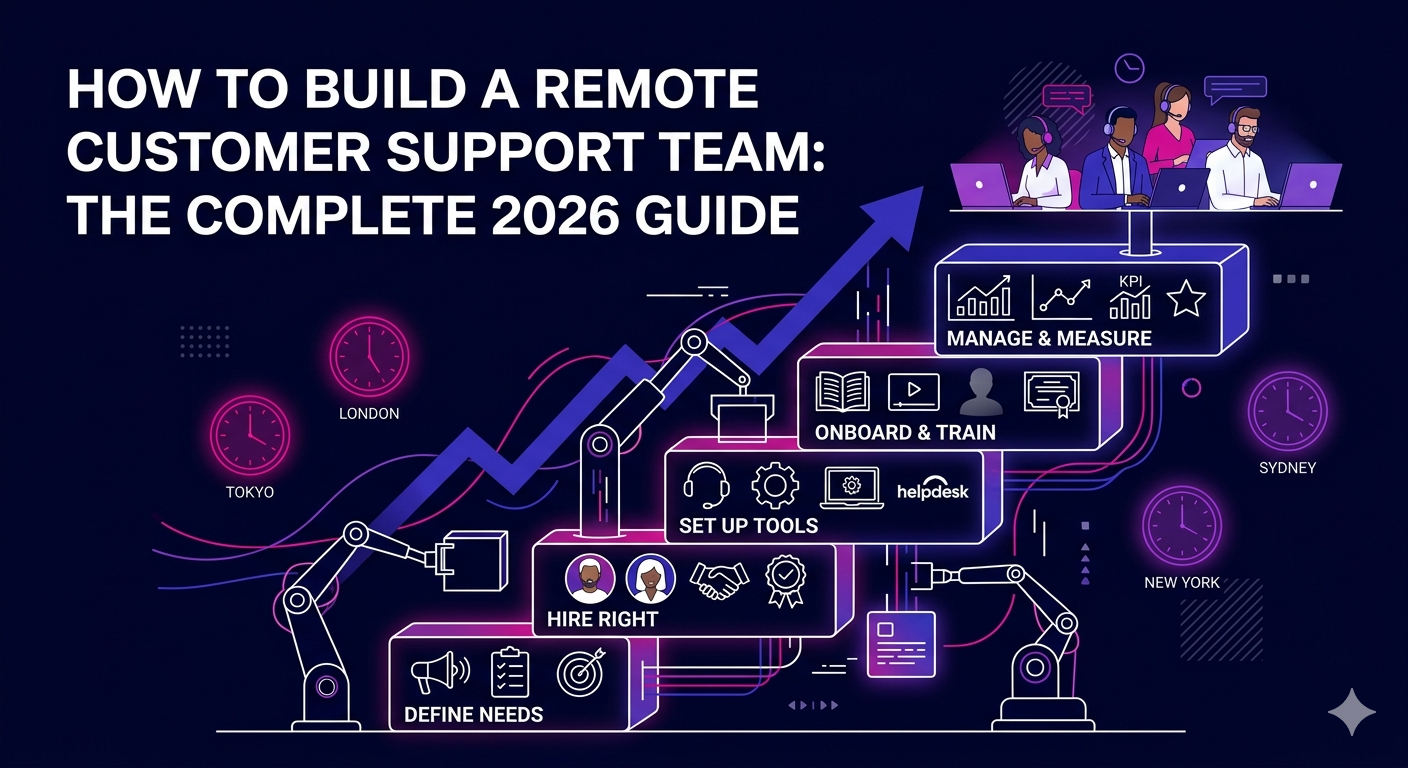
This guide walks you through every stage of the process: deciding what you need, finding and hiring the right people, setting up the tools and workflows that keep remote teams productive, and measuring performance in a way that actually drives improvement.
Why Build a Remote Customer Support Team?
The shift to remote customer support is not just a cost-cutting exercise. When done correctly, it produces better outcomes for customers and businesses alike.
- 24/7 coverage without shift premiums: A geographically distributed team allows you to cover multiple time zones naturally, providing round-the-clock support without paying overnight premiums to a local workforce.
- Lower operational costs: Remote support teams eliminate the need for office space, equipment, and the higher salary expectations of in-market hires. Businesses typically save 40 to 55 percent compared to building an equivalent in-house team.
- Access to multilingual talent: Remote hiring lets you bring on native speakers of the languages your customers use, dramatically improving the quality of support for international audiences.
- Scalability on demand: During peak seasons or product launches, scaling a remote team up or down is far faster and more affordable than adjusting a physical headcount.
- Business continuity: A distributed team is inherently more resilient to local disruptions like power outages, weather events, or regional crises.
Step 1: Define Your Support Needs Before You Hire
The most common mistake businesses make when building a remote customer support team is hiring before they have defined what they actually need. Clarity upfront saves significant time and money.
Identify Your Support Channels
Where do your customers reach out? Email, live chat, phone, social media DMs, and self-service portals each require different skills and tools. List your active channels and determine which need dedicated coverage versus shared handling.
Determine Volume and Coverage Hours
Review your support ticket data to understand peak hours, average response times, and current backlog. This tells you how many agents you need and whether you require overlapping shifts or follow-the-sun coverage across time zones.
Define Tier Structure
Most effective remote support teams operate across tiers. Tier 1 handles common queries and FAQs. Tier 2 manages more complex issues requiring product knowledge. Tier 3 involves escalations to technical or specialist staff. Knowing your tier needs shapes your hiring criteria and training plan.
Step 2: Hire the Right Remote Customer Support Professionals
The quality of your remote support team is determined almost entirely by who you hire. Here is how to approach it strategically.
Core Skills to Look For
- Written and verbal communication: Remote agents rely heavily on written communication. Look for candidates who write clearly, concisely, and with warmth.
- Empathy and patience: Support work is emotionally demanding. The best agents remain composed and solution-focused even when customers are frustrated.
- Technical aptitude: Agents need to learn your product quickly, navigate support tools, and troubleshoot issues with minimal hand-holding.
- Self-management: Remote work requires discipline and strong time management. Ask about their remote work experience and how they structure their day.
- Problem-solving ability: Customers rarely present issues in neat, textbook ways. Look for agents who can think on their feet and find workable solutions.
Where to Find Remote Support Talent
Pre-vetted remote staffing platforms are the most efficient route for most businesses. They reduce the time and risk involved in sourcing, screening, and shortlisting candidates. You can explore The Remote Reps’ vetted remote customer support experts to connect with professionals who have already been assessed for the skills and reliability needed for remote support roles.
Conduct a Skills-Based Assessment
Before making any offer, give candidates a realistic task. Present a sample support scenario and ask them to write a response. Evaluate tone, accuracy, clarity, and how well they handle ambiguity. This single step eliminates a large proportion of underqualified applicants.
Step 3: Set Up the Right Tools and Infrastructure
A remote customer support team is only as effective as the tools that power it. Here are the categories of software every remote support operation needs in 2026:
Help Desk and Ticketing Software
Platforms like Zendesk, Freshdesk, or Help Scout centralize all incoming support requests, assign tickets, track resolution times, and give managers visibility into team performance. This is the operational backbone of any remote support team.
Live Chat and Messaging Tools
Intercom, Tidio, and Crisp allow agents to handle real-time conversations across your website and app. Many now integrate AI-assisted responses that help agents handle higher volumes without sacrificing quality.
Internal Communication Platforms
Slack or Microsoft Teams keeps remote agents connected to each other and to team leads. Dedicated channels for product updates, escalations, and general team communication reduce isolation and keep everyone aligned.
Knowledge Base Software
A well-maintained internal knowledge base reduces resolution times and ensures consistency across your team. Tools like Notion, Confluence, or the built-in knowledge bases in Zendesk and Freshdesk work well for most support teams.
Time Tracking and Workforce Management
For remote teams, tools like Clockify, Time Doctor, or Assembled help managers monitor productivity, schedule shifts, and identify workload imbalances before they affect service quality.
Step 4: Build an Onboarding and Training Program
Remote agents cannot absorb company culture and product knowledge by osmosis the way in-office employees might. A structured onboarding program is essential.
- Product training: Agents should understand your product deeply before handling a single ticket. Create recorded walkthroughs, written guides, and a structured learning path that new hires can complete asynchronously.
- Brand voice and tone guide: Define how your brand communicates. What words do you use? What do you avoid? How do you handle angry customers? Provide written examples of good and poor responses.
- Escalation protocols: Document clearly when and how agents should escalate issues. Ambiguity in escalation paths is a leading cause of poor customer experiences and agent frustration.
- Shadow sessions: Pair new hires with experienced agents for the first one to two weeks. Even done asynchronously through recorded sessions, this builds confidence and context far faster than documentation alone.
Step 5: Manage Performance and Maintain Quality
Building a remote customer support team is an ongoing process, not a one-time project. Consistent performance management is what separates good teams from great ones.
Set Clear KPIs From Day One
Track metrics that reflect both efficiency and quality. Key indicators include first response time, resolution time, customer satisfaction score (CSAT), first contact resolution rate, and ticket backlog size. Share these metrics with your team regularly so everyone understands what good looks like.
Run Regular Quality Reviews
Designate time each week to review a sample of support interactions. Look for tone, accuracy, policy adherence, and empathy. Use these reviews as coaching opportunities rather than disciplinary ones. Agents who receive consistent, constructive feedback improve faster and stay longer.
Hold Weekly Team Check-ins
A brief weekly call keeps remote agents connected, surfaces recurring issues, and gives managers a chance to share updates and reinforce team culture. Remote work can feel isolating; regular human contact makes a significant difference in retention and morale.
For a comprehensive external resource on remote support best practices, Help Scout’s guide to building a remote customer support team offers research-backed strategies that complement the operational framework outlined here.
Frequently Asked Questions About How to Build a Remote Customer Support Team
How much does it cost to build a remote customer support team?
The cost to build a remote customer support team depends on team size, coverage hours, and agent location. In 2026, remote support agents typically cost between $800 and $2,200 per month depending on experience and geography. This is 40 to 55 percent less than hiring equivalent in-house staff when you factor in salary, benefits, and office overhead.
How many agents do I need when I build a remote customer support team?
When you build a remote customer support team, start by calculating your average monthly ticket volume and dividing by the realistic capacity of one agent, typically 400 to 600 tickets per month for email and chat support. Add coverage buffers for time zones, training periods, and peak volume spikes to avoid understaffing.
What tools are essential when I build a remote customer support team?
When you build a remote customer support team, the minimum technology stack includes a ticketing or help desk platform, a live chat tool, an internal communication app, and a shared knowledge base. As the team grows, add workforce management and quality assurance tools to maintain consistency at scale.
How do I maintain quality when I build a remote customer support team across multiple time zones?
To maintain quality when you build a remote customer support team across time zones, invest in thorough documentation, asynchronous training resources, and a consistent quality review process. Pair newer agents with experienced leads in each region and use your ticketing system to flag low-CSAT interactions for review regardless of when they occurred.
How long does it take to build a remote customer support team from scratch?
If you use a pre-vetted staffing partner, you can build a remote customer support team and have agents handling tickets within 2 to 4 weeks. Building through independent job postings and screening typically takes 6 to 10 weeks. Either way, allow 30 to 60 additional days for onboarding and performance stabilization before evaluating results.
Can I build a remote customer support team that also handles sales or upselling?
Yes. Many businesses build a remote customer support team that handles both reactive support and proactive sales touchpoints such as renewal reminders, upsell offers, and reactivation outreach. For a more dedicated sales function, pairing support agents with specialized remote sales representatives gives you better results without diluting your support quality.
Build Your Remote Customer Support Team the Right Way
Building a remote customer support team is one of the highest-leverage investments a growing business can make. When you hire the right people, equip them with the right tools, and manage them with clear goals and consistent feedback, the result is faster resolutions, higher satisfaction scores, and a support operation that actually scales with your business.
The companies winning on customer experience in 2026 are not those with the biggest offices. They are the ones with the most skilled, well-supported remote professionals delivering great service from anywhere in the world.
Ready to get started? Explore The Remote Reps’ pre-vetted remote customer support experts and build your team with professionals who are ready to deliver from day one.