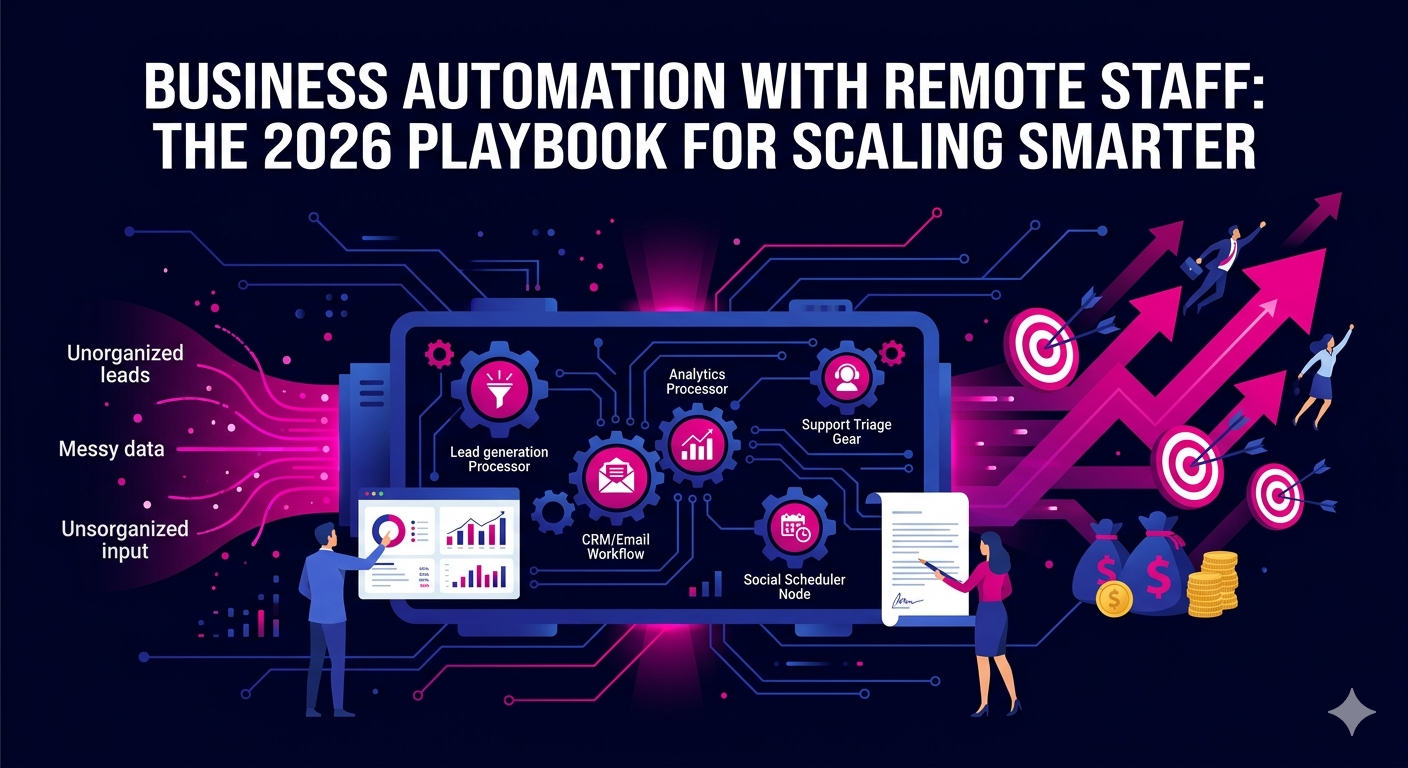
If you are still running your business the same way you did three years ago, you are already behind. The companies pulling ahead in 2026 are not just hiring remote staff or using automation tools in isolation. They are combining both into a single, high-output growth engine. Business automation with remote staff is no longer a competitive advantage reserved for enterprise giants. It is now the operating standard for lean, fast-moving companies of every size.
In this guide, you will learn exactly how to build that engine, which processes to automate, which roles to hire remotely, and how to tie it all together into a system that scales without burning out your team or your budget.
Why Business Automation with Remote Staff Works So Well Together
Automation and remote staffing are each powerful on their own. Together, they create something greater than the sum of their parts.
Here is the core logic: automation handles repetitive, rule-based tasks around the clock. Remote staff handle judgment, communication, and creativity. When you structure your operations this way, you eliminate the two biggest drains on any business: wasted human time on low-value work and the high cost of in-house overhead.
Consider a few hard numbers from 2026 market data. The average remote worker saves a business between $11,000 and $16,000 per year compared to an equivalent in-office hire, according to research from Global Workplace Analytics. Layer intelligent automation on top of that, and productivity gains of 20 to 35 percent become achievable within the first 90 days of implementation.
The result is a business that moves faster, spends less, and delivers more value to customers without requiring you to be in the weeds every day.
The Core Processes You Should Automate First
Not everything deserves to be automated. The goal is to identify high-volume, low-complexity tasks that eat up your team’s time without adding strategic value. Start here.
Lead Generation and Outreach
Manual prospecting is one of the most expensive ways to fill your pipeline. In 2026, automated lead generation tools can identify ideal prospects, enrich contact data, and trigger personalized outreach sequences without any human input until a prospect replies. Your remote lead generation experts then step in to handle conversations, qualify interest, and move leads into your sales process.
This combination means your pipeline never goes quiet, even when your team is offline.
Email and CRM Workflows
Follow-up emails, nurture sequences, deal stage updates, and reminder notifications can all be automated through your CRM. Set the logic once, and the system runs it indefinitely. Your remote sales reps focus exclusively on calls, demos, and closing rather than administrative busywork.
Reporting and Analytics
Dashboards that pull live data from your ad platforms, CRM, and website can be configured to update automatically and deliver reports to stakeholders on a schedule. Your remote digital marketers then interpret the data and make decisions rather than spending hours compiling it.
Customer Support Triage
AI-powered chatbots and helpdesk automation can handle tier-one support tickets, answer frequently asked questions, and route complex issues to the right team member instantly. This means your remote customer support staff spend their time resolving real problems, not copy-pasting the same response for the fifteenth time that day.
Social Media Scheduling
Content calendars, post scheduling, and basic engagement monitoring can all be automated. Your remote social media manager focuses on strategy, community building, and content creation rather than the mechanical act of posting.
Which Remote Roles Amplify Automation the Most
The impact of automation multiplies when the right remote roles are in place to act on the output. Here are the positions that deliver the highest return when paired with automation tools.
Sales Development Representatives
Automated prospecting tools generate the list. Automated sequences warm the contacts. Your remote SDR steps in to handle replies, book meetings, and build relationships. This is one of the highest-leverage combinations available to any sales-driven business in 2026.
Virtual Assistants and Executive Assistants
Virtual assistants and executive assistants work best when automation handles the routine and they handle the exceptions. Calendar scheduling tools can automate booking logic, but your remote VA manages the nuance, reschedules conflicts, prepares briefings, and keeps your day running smoothly.
GTM Engineers
Growth infrastructure requires someone who understands both the technical and strategic side of automation. Remote GTM engineers design and maintain the systems that power your go-to-market motion, integrating your CRM, outreach tools, analytics stack, and data workflows into a single cohesive machine.
PPC and Media Buying Specialists
Ad platforms now offer sophisticated automated bidding and audience optimization features. But they still require skilled human oversight to interpret results, test creative, and make budget decisions. Remote PPC experts and media buyers bring the strategic layer that automation alone cannot replicate.
Building Your Automation and Remote Staff System: A Step-by-Step Approach
The biggest mistake businesses make is trying to automate everything at once. That leads to broken workflows, frustrated staff, and wasted money. Use this sequence instead.
Step 1: Audit Your Current Workflows
List every repeating task your team performs each week. Flag anything that is rule-based, high-volume, or does not require human judgment. These are your automation candidates.
Step 2: Map the Human Touchpoints
For each workflow you plan to automate, identify where a human needs to step in. This tells you exactly which remote roles you need and what their responsibilities look like. You are designing the job description before you post it.
Step 3: Select Your Tool Stack
In 2026, the most widely used automation tools for small and mid-sized businesses include HubSpot, Zapier, Make (formerly Integromat), Instantly, and Apollo. Choose tools that integrate well with each other and with the platforms your remote staff already use.
Step 4: Hire Remote Staff Aligned to Your Automation Gaps
Once your automation layer is in place, hire remote specialists to fill the strategic and relational gaps. Platforms like The Remote Reps specialize in placing vetted remote professionals across sales, marketing, operations, and customer service roles, making it faster and more reliable than general job boards.
Step 5: Set Clear KPIs and Review Cadences
Automation without measurement is just noise. Define specific metrics for every automated workflow and every remote role. Review performance weekly during the first 90 days, then move to monthly once things are stable.
Common Pitfalls to Avoid
Even well-intentioned implementations can stall. Watch out for these patterns.
- Over-automating without human review: Automation errors compound quickly if no one is checking outputs. Assign a remote team member to audit automated workflows regularly.
- Hiring remote staff before the systems are ready: If your tools are not set up, your remote team will spend their time firefighting instead of delivering value. Build first, hire second.
- Ignoring onboarding for remote roles: Remote staff need clear documentation, access to the right tools, and defined communication rhythms from day one. A weak onboarding process is the fastest way to lose good hires.
- Treating automation as a one-time project: Workflows evolve. Your automation setup needs regular maintenance and updates to stay aligned with your business needs.
The ROI of Combining Automation with Remote Staff in 2026
Businesses that have successfully integrated business automation with remote staff are reporting measurable results across every core metric. Reduced cost per lead, shorter sales cycles, faster customer response times, and higher team output per dollar spent are consistent outcomes when the model is implemented correctly.
A well-structured remote team supported by intelligent automation can out-execute a team twice its size operating through traditional in-office methods. That gap is widening every year as the tools improve and remote talent becomes more specialized.
For a deeper look at how this approach is transforming businesses across industries, McKinsey’s research on automation and workforce transformation provides extensive data on productivity gains and adoption trends shaping business operations through 2026 and beyond.
Conclusion: Start Building Your Automated Remote Operation Today
The window for early-mover advantage on business automation with remote staff is still open, but it is closing. Companies that get this right in 2026 will have a structural cost and speed advantage that is very difficult to close once it is established.
You do not need to overhaul everything at once. Pick one workflow, automate it, hire one remote specialist to manage it, measure the results, and build from there. The compounding effect of each improvement you make will become visible within weeks.
Ready to hire the remote talent that makes your automation strategy work? Explore the full range of vetted remote professionals available through The Remote Reps virtual assistant and remote staffing services and take the first step toward a leaner, faster, more scalable operation.
Frequently Asked Questions About Business Automation with Remote Staff
What is business automation with remote staff and how does it work?
Business automation with remote staff is the practice of using software tools to handle repetitive, rule-based tasks while employing remote professionals to manage the strategic, relational, and judgment-intensive work those tools cannot perform. The two operate as a coordinated system: automation handles volume and consistency while remote staff provide expertise and adaptability. Together they reduce costs, increase output, and allow businesses to scale without adding proportional overhead.
Which tasks are best suited for business automation with remote staff?
The tasks most suited for automation within a remote staffing model include lead prospecting and outreach sequencing, CRM updates and follow-up workflows, report generation, social media scheduling, invoice processing, customer support triage, and data entry. Remote staff then take over wherever human judgment, communication, or creativity is required, such as qualifying leads, handling escalations, interpreting analytics, or managing client relationships.
How much can a business save by combining automation and remote staff?
Savings vary based on industry, team size, and the complexity of workflows automated. However, most businesses in 2026 report a 30 to 60 percent reduction in the cost of equivalent output compared to fully in-house teams. Remote staff alone save businesses an average of $11,000 to $16,000 per year per employee compared to local hires. Automation compounds those savings further by reducing the number of hours remote staff need to spend on low-value tasks.
What tools do I need to start with business automation with remote staff?
A basic automation stack for most businesses includes a CRM with workflow automation such as HubSpot or Salesforce, an integration platform such as Zapier or Make, an outreach automation tool such as Instantly or Apollo, and a project management platform such as Asana or ClickUp for remote team coordination. The right stack depends on your specific business model and the remote roles you are hiring for, so start simple and add complexity as your team and processes mature.
How do I manage remote staff working within automated systems?
Managing remote staff within an automated operation requires clear documentation of every workflow, defined handoff points between automated processes and human tasks, and regular check-ins through asynchronous communication tools like Slack or Loom. Set measurable KPIs for every remote role tied to the outcomes your automation is designed to produce. Weekly performance reviews in the first 90 days and monthly reviews after stabilization are a reliable management cadence for most teams using business automation with remote staff.
Is business automation with remote staff suitable for small businesses?
Yes, and in many ways it is more impactful for small businesses than for large ones. Small businesses often have the most to gain from eliminating manual bottlenecks and the least capacity to absorb the overhead of large in-house teams. Starting with one or two automated workflows and one or two remote specialists is a low-risk way to validate the model before scaling it. The tools available in 2026 are accessible, affordable, and designed to work without a dedicated IT department.